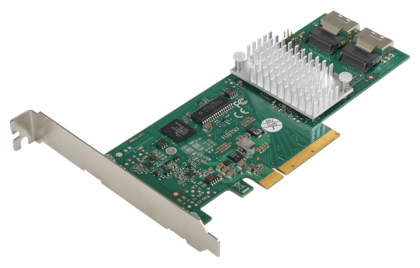
I recently picked up a few Fujitsu D2607 RAID Controllers (cheap off eBay!) to replace the Rocket RAID controller in my NAS, which I have come to distrust as it has at times been a little flaky (plus, they have never provided a single firmware update, and support if asking anything is non-existent). The Fujitsus use the popular and well-thought-of LSI Controller chips.
As I really like ZFS on Linux I really had no need for the RAID functionality on the cards, and in fact found the RAID BIOS (and the need to configure each drive as a separate Virtual Drive in order to be presented to Linux) to be a real PITA. My testing showed that replacing a drive in the inevitable event of a drive failure would almost certainly result in loss of the whole array. Not really what I was looking for.
So I did a bit of research, and found that the usual approach for these (and other LSI based cards) is to flash a different BIOS onto them with the intention of turning the cards into a simple (non-RAID) controller.
A bunch more research, downloaded some files, and fairly quickly rendered my first D2607 inoperable! This is looking good so far! So, whole lot more searching, some experimentation, and some conclusions reached. There is a LOT of information out there about LSI cards, and how to flash them, and most of it is just plain WRONG, which became quite apparent when I finally found a method that worked.
Many thanks to "Jonny" who posted in This Forum Thread with a solid set of instructions on how to do it. You can go over there, or read further on here, where I'll tell you exactly what worked for me. Once I'd recovered my first failed attempt, my second and third cards were flashed within 10 minutes or so, no errors. And they work beautifully, just as I had hoped!
What You'll Need
Preparation
Getting it down and dirty!
If any command fails, reboot and start that step again.
Your RAID card is now blank.
Yeehah! Your card is now flashed. If your card is a 4i, you can probably stop here. If it's an 8i (2 SAS ports) then at this stage probably only the top port works, and you'll only be able to access 4 Hard Drives.
Check the drives are available, you should be all good to go!



I've added quite a few new Webcams to the Cameras Page.
There are some amazing wildlife ones on the African countries, best viewed when it is night-time there as the animals come out to eat and drink after dark!
On the Menu Bar to the right of Blog you will see an Icon.

That Icon toggles between Light and Dark Modes.
Enjoy!
Dave
Welcome to the New Site!
There is lots of stuff to explore here, I'll highlight parts every now and again!
Come back soon!
Dave